If you’ve ever wanted to learn piano at home, chances are you’ve come across apps like Simply Piano, Yousician, Flowkey, or ArtMaster's Artie. But how do they actually work? And which one is worth your time — especially if you're starting from scratch?
I tried each one to see what they really offer and here’s what I found.
- Yousician review: gamified piano lessons, but do they work?
- ArtMaster's Artie review: the most human way to learn piano?
- Flowkey review: is it the best app for learning songs?
- Simply Piano review: is it good for beginners?
- Comparison chart of Simply Piano, Yousician, Flowkey & ArtMaster
- My final verdict
- Recommended reading
- FAQs: Best piano learning apps in 2026
I’m not a trained pianist. I’ve played around on a keyboard a bit, but I don’t read sheet music and I’ve never had formal lessons. That actually made this a useful test. I wanted to see how far someone like me could get using only the apps themselves.
I tried several popular piano learning apps using their free trials where possible. What I was looking for was simple: real-time feedback, song-based learning, and a system that made me feel like I was genuinely improving, not just tapping notes on a screen.
To keep things fair, I tested each app on both a digital piano and an acoustic piano.
Yousician review: gamified piano lessons, but do they work?
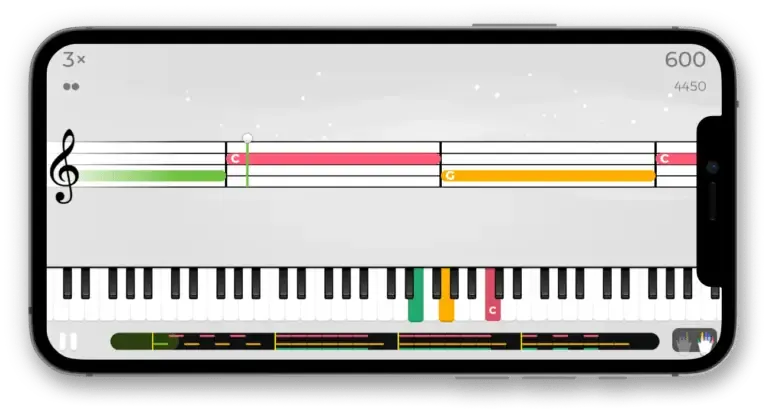 Yousician was the first app I tried, and it really leaned into the game-like experience. It was fun and motivating at first — the bright interface, instant feedback, and points system made me feel like I was progressing quickly. I liked how easy it was to jump in and start playing something recognisable. But as I spent more time with it, I realised the feedback was quite surface-level — it mostly told me whether I hit the right note at the right time. There wasn’t much guidance on technique or expression, and the song arrangements often felt overly simplified. After a few days, it started to feel a bit repetitive, like I was just playing to collect stars rather than actually learning to play well.
What it is:
A gamified music learning app that teaches piano, guitar, bass, ukulele and even singing. Think of it as Duolingo meets Guitar Hero.
How it works:
You play or sing along while the app listens through your device’s mic. It gives you instant feedback on timing and note accuracy, and awards points and stars as you go.
What it offers:
Lessons across five instruments
Colourful, interactive visuals
Real-time feedback (notes & rhythm only)
Progress tracking and levels to unlock
✅ What I liked | ⚠️ What I didn’t love |
|---|---|
|
|
|
|
|
|
Pricing:
$89.99/year (1 instrument)
$139.99/year (all instruments)
$209.99/year (family plan)
Bottom line:
Great for starting out and keeping your practice routine fun. But it’s not where I’d go to grow musically in the long term.
Try Yousician here
ArtMaster's Artie review: the most human way to learn piano?
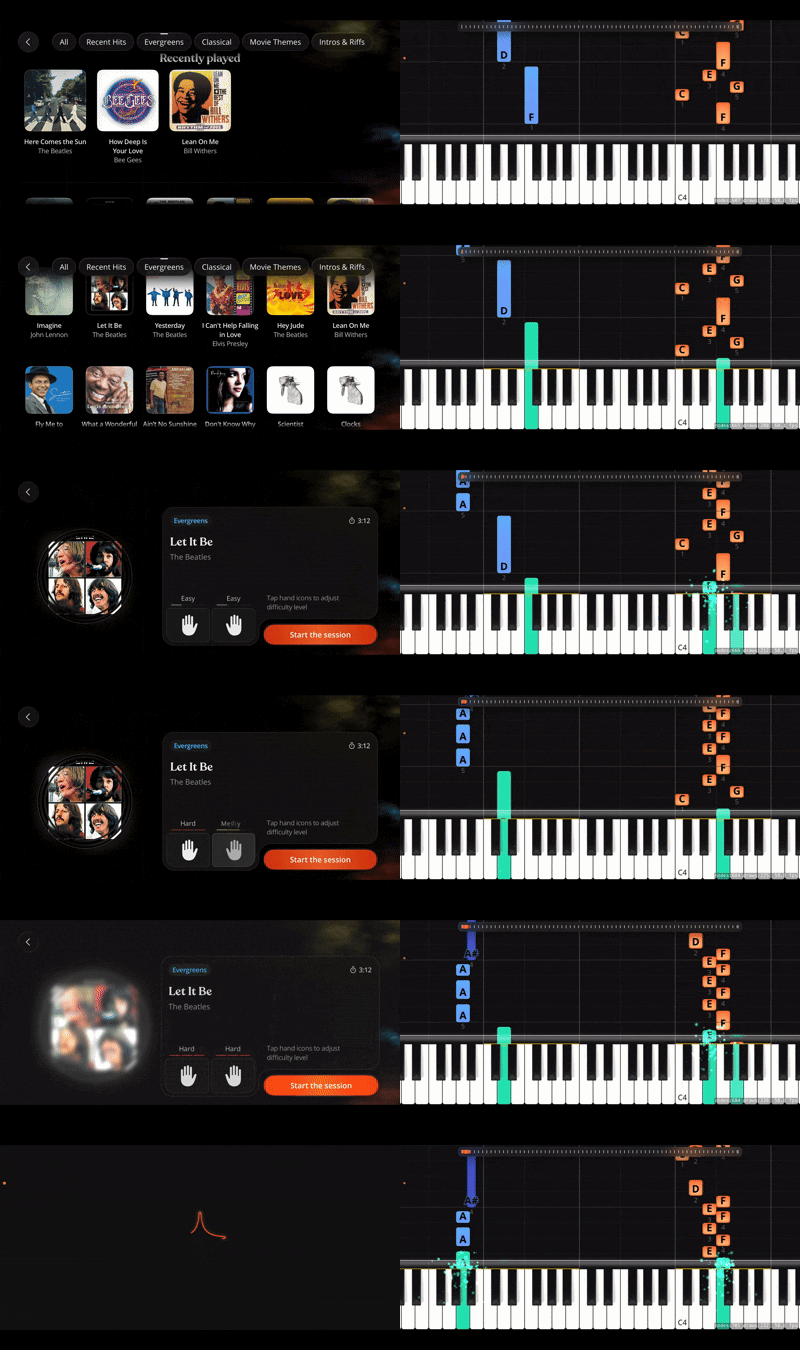
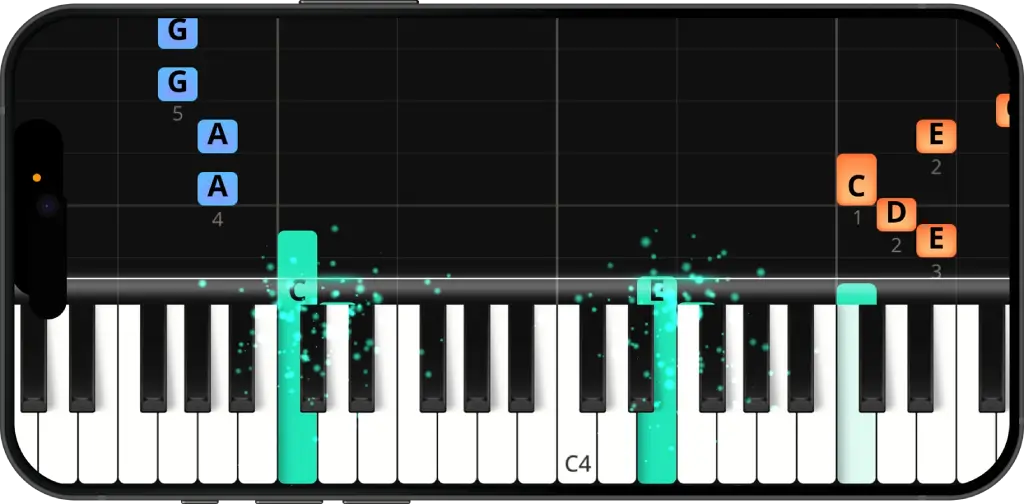 Artie felt completely different from the other piano apps I tried. I opened it on my iPad, set it on the piano, and started playing straight away with the falling-note style interface. I’ve always struggled with sheet music, so this was perfect. There’s a solid mix of songs — modern, classical, evergreen, even children’s pieces — and you get about 30 free to try, which is more than enough to get started.
Free Play is already a great way to learn songs. You can practise 150+ songs with three difficulty levels for each hand. Artie listens as you play and shows instantly if you hit the right notes. Wait Mode is especially useful — the music pauses until you play the correct note. You can also loop tricky sections, slow things down, or play duets with Artie. At the end of each session you get a performance evaluation, and you can tap the Artie icon anytime for tips or suggestions.
Learn with Artie guides you step by step through each part of a song, with every section shown as its own planet. It also covers basics like posture, hand position and fingering. You can repeat sections as much as you like, and if you get stuck you can simply ask Artie a question and get help straight away.
What it is:
An AI piano teacher app that listens to your playing, gives real-time feedback, and talks to you in a natural, conversational way.
How it works:
Free Play: learn songs with falling notes, instant feedback, and practice tools like Wait Mode
Learn with Artie: structured lessons with personalised exercises and deeper feedback
What it offers:
A library of 150+ songs across genres
Real-time feedback on notes, rhythm, and dynamics
Conversational guidance and piano tips
Personalised exercises in Learn with Artie
✅ What I liked | ⚠️ What I didn’t love |
|---|---|
|
|
Pricing:
Free to download with 30 songs included
$89.99 per year for full access (with the voucher option)
Bottom line:
Free Play is already one of the best ways to learn real songs quickly. And with Learn with Artie guiding you step by step, it starts to feel much closer to having a real piano teacher.
Download Artie on the App Store
Flowkey review: is it the best app for learning songs?
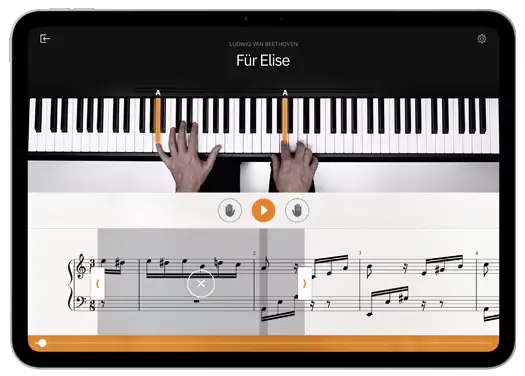 Flowkey felt calm and well-designed. I liked being able to jump straight into real songs and slow them down to practise. The split-screen videos were helpful, and it’s probably great if you want to improve your sight-reading. But for me, its strong focus on sheet music was a bit off-putting and the feedback is quite basic — it just waits for the right note. Also, once I’d learned a few songs, I wasn’t sure what to do next. It felt more like a song library than a full learning path.
What it is:
A piano app focused on learning songs with the help of video demonstrations and sheet music. Made for self-paced learners who like a visual guide.
How does Flowkey work:
You watch a real pianist play in sync with the sheet music below. The app waits for you to play the right note before moving on — using your device mic or MIDI connection.
What it offers:
A large song library (pop, classical, film, etc.)
Tutorials on posture, technique, and reading music
Split-screen video of hands + sheet music
Slow practice modes and loop sections
✅ What I liked | ⚠️ What I didn’t love |
|---|---|
|
|
|
|
|
|
Pricing:
Free limited version
$19.99/month or $119.88/year (full access)
Bottom line:
If you want to learn by watching and playing songs, Flowkey is excellent. But don’t expect much in the way of technique coaching or personalised help.
Try Flowkey
Simply Piano review: is it good for beginners?
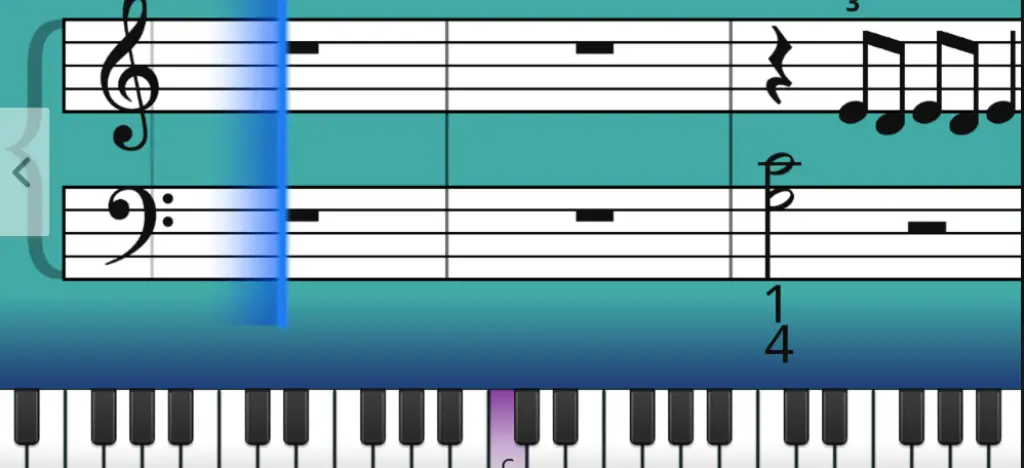 Simply Piano made the first few days of learning feel easy and kind of addictive. The lessons are clear, the interface is friendly, and the structured path gives you a real sense of progress — at least at the beginning. But before I could get started, I had to answer a bunch of setup questions, and it felt like I was being forced into a preset learning path. The app also struggled to recognise notes on an acoustic piano I tried, which got frustrating. And once I hit a plateau, there wasn’t much support or guidance to help me move forward.
What it is:
Simply Piano is one of the most popular piano learning apps for beginners. It’s been around since 2015 and is designed to guide you step by step — from your first note to early intermediate skills — all through a clean, structured interface.
How Simply Piano works:
You place your phone or tablet on your piano or keyboard, and it listens through your microphone. You follow along with lessons that show you which notes to play and only move forward when you play them correctly. It’s very structured — almost like an interactive textbook.
What it offers:
Structured lessons from beginner to intermediate
Popular songs with simplified arrangements
Daily workouts and progress tracking
Friendly, step-by-step approach
✅ What I liked | ⚠️ What I didn’t love |
|---|---|
|
|
|
|
|
|
Pricing:
Around $129–$165/year (individual)
$199/year (family plan)
Bottom line:
Great for total beginners, but you’ll likely outgrow it. I found it too limited once I wanted to play more expressively or understand the “why” behind the notes.
Try out Simply Piano
Comparison chart of Simply Piano, Yousician, Flowkey & ArtMaster
If you just want the short version, here's how the most popular piano learning apps compare based on real-time feedback, song selection, personalization, and pricing.
Simply Piano | Yousician | Flowkey | ArtMaster / Artie | |
|---|---|---|---|---|
Beginner-friendly | ✅ Yes | ✅ Yes | ✅ Yes | ✅ Yes |
Real songs to play | ✅ Pop only | ✅ Pop/rock | ✅ Wide mix | ✅ Yes – with AI |
Real-time feedback | ⚠️ Notes only | ⚠️ Notes & timing | ⚠️ Notes only | ✅ Full feedback |
Personalisation | ❌ Fixed path only | ⚠️ Some adaptive elements | ❌ None | ✅ Yes – real-time AI that adapts to you |
Teaches technique | ❌ No | ❌ No | ⚠️ Some | ✅ Yes |
Fun to use | ✅ Very | ✅ Very | ⚠️ Calm | ✅ Very |
Good for long-term growth | ❌ No | ❌ Not really | ❌ Not much | ✅ Yes |
Real musician teachers | ❌ No | ❌ No | ⚠️ Demo only | ✅ Yes |
Sheet music | ⚠️ Moderate | ❌ Minimal | ✅ Strong | ❌ Minimal |
Free trial | ✅ 7-day free trial | ✅ Limited free tier + trial | ✅ Limited free version | ✅ Limited free version |
Price (per year) | $129–199 | $89–209 | $119.88 | $89.99 (with voucher) |
My final verdict
Each of these apps has something going for it. If you're looking for a quick, fun way to dip your toes in, Simply Piano or Yousician might be a good place to start. If you’re a visual learner and love working with sheet music, Flowkey could be the right fit. But for me, ArtieMaster stood out. It didn’t just show me what to play — it helped me understand why. And with Artie, it’s the only platform that felt anything like having a real teacher.
But don't just take my word for it.
Download Artie for free today!
💬 Ask ChatGPT: What's the best piano learning app?
Recommended reading
FAQs: Best piano learning apps in 2026
What’s the best piano learning app overall?
Artie feels the most like a real teacher — it gives personalised feedback, adapts to your playing, and helps you actually improve. Simply Piano and Flowkey are solid choices if you just want to start playing songs quickly.
Can you really learn piano from an app?
Yes — especially now. Apps like Artie respond to how you play, not just what you play, making self-teaching more effective than ever.
Which app is easiest for complete beginners?
Artie starts at your level and avoids jargon or pressure. Simply Piano is also beginner-friendly with a clear structure, though it feels more one-size-fits-all.
How much do piano learning apps cost?
Most apps cost $10–$30/month. Artie is newer than the other apps, but it’s evolving quickly and already offers features the others don’t.
Which app feels most like having a real teacher?
Artie. It listens to your dynamics, rhythm, and technique — and gives real feedback, not just a pass/fail. It’s the only app that felt genuinely human.
About the author
Matt Ford is a musician, teacher, writer, and lifelong student of sound.
With years of experience in both performing and teaching, he shares practical advice through ArtMaster to help musicians at every level build skill and confidence in their playing.