If you’ve searched for the best piano learning app, you’ll know the problem. They all promise roughly the same thing: learn faster, play real songs, get instant feedback, practise whenever you like.
Which sounds great. It also sounds suspiciously like every other app advert you’ve ever seen.
So I tried four popular piano learning apps: Artie by ArtMaster, Simply Piano, Flowkey and Yousician.
- Quick answer: what is the best piano learning app?
- Best piano learning apps compared
- What makes a good piano learning app?
- Artie review: best for guided practice
- Simply Piano review: best for a structured beginner path
- Flowkey review: best for learning songs with sheet music
- Yousician review: best for gamified learning
- Artie vs Simply Piano, Flowkey and Yousician
- Can you learn piano without reading sheet music?
- My final verdict
- Recommended reading
- FAQs: best piano learning apps
When I started testing, I wanted to know three things:
Could I start playing quickly?
Did the feedback actually help?
Did the app make me feel like I was learning piano, not just completing a screen-based task?
I’m not a trained pianist. I can play around on a keyboard, I understand some basic theory, but I don’t read sheet music fluently and I’ve never had formal piano lessons. Which, I suspect, puts me fairly close to a lot of adult beginners: interested, musical, slightly impatient, and not especially keen to spend the first month decoding dots on a stave.
So, which piano learning app is actually worth trying?
Quick answer: what is the best piano learning app?
The best piano learning app depends on how you want to learn.
Artie by ArtMaster is the best choice if you want guided practice, AI feedback and a simple way to learn songs without reading sheet music.
Simply Piano is best if you want a structured beginner course.
Flowkey is best if you want a large song library with sheet music and video demonstrations.
Yousician is best if you enjoy game-style learning with scores, levels and challenges.
For me, Artie was the strongest overall choice because it helped with the hardest part of learning piano: knowing what to do when you get stuck.
Best piano learning apps compared
App | Best for | Learning style | Feedback | Best feature |
|---|---|---|---|---|
Artie by ArtMaster | Beginners who want guided practice | Falling notes, Wait Mode, looping and one-hand practice | AI-powered practice feedback | Wait Mode |
Simply Piano | Complete beginners | Step-by-step lessons | Basic note and timing feedback | Clear beginner path |
Flowkey | Learning songs | Sheet music, video demos and song practice | Basic note recognition | Large song library |
Yousician | Gamified learning | Points, levels and challenges | Score-based feedback | Motivation through gameplay |
What makes a good piano learning app?
A good piano learning app should do more than show you the next note.
It should help you start quickly, keep you motivated and give you some kind of feedback when you make a mistake. But the best apps go further. They help you practise.
That is the bit people often underestimate.
Learning piano is not just about playing the right note once. It is about slowing down, repeating awkward sections, getting your hands to cooperate and understanding why something keeps going wrong.
Some apps are brilliant at getting you started. Some are great for browsing songs. Some feel like games. But the best ones help you practise in a way that feels calm, useful and sustainable.
Artie review: best for guided practice
 Artie by ArtMaster felt the most different from the other apps I tried.
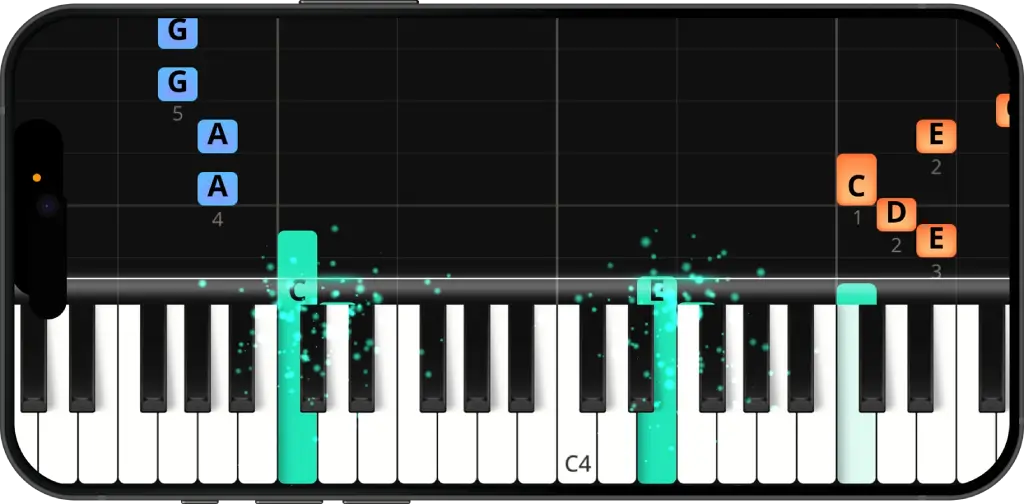
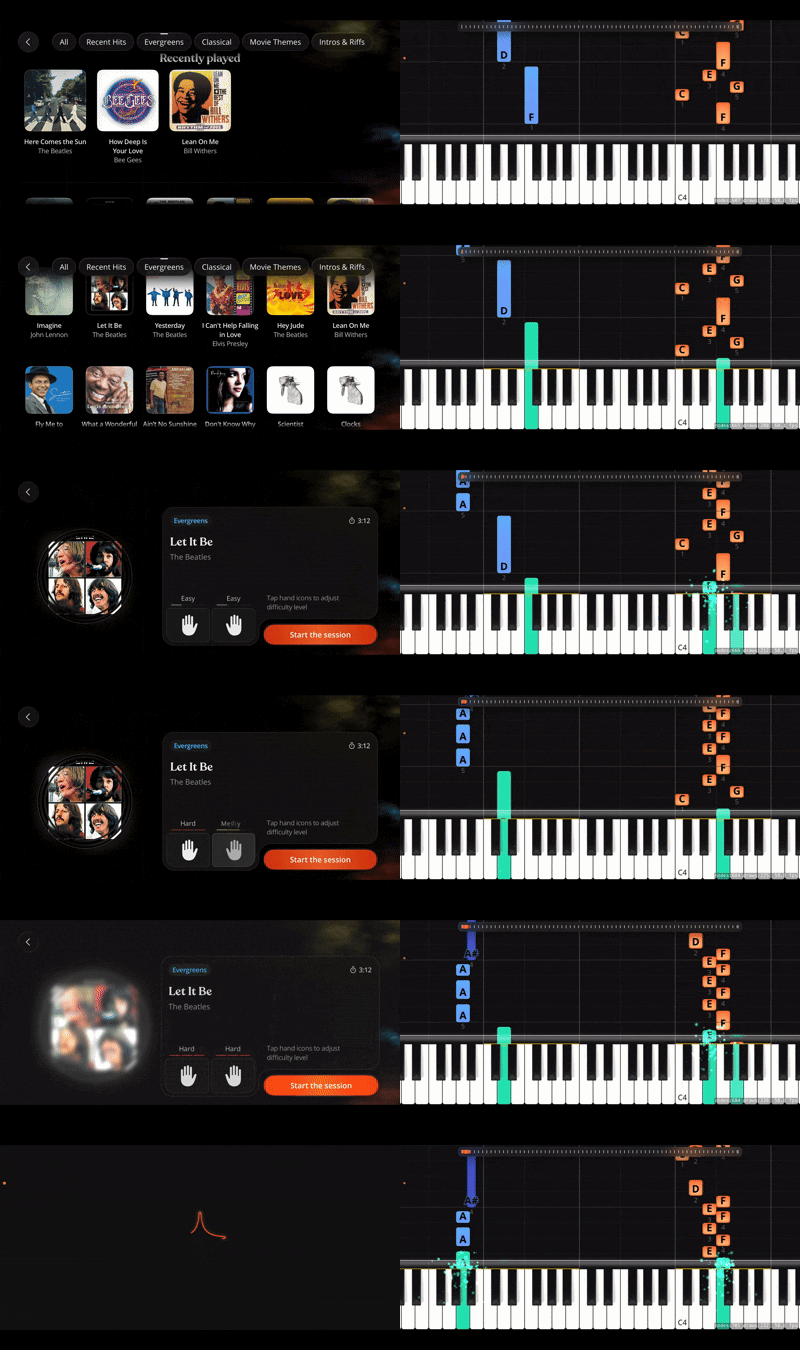
You choose a song, place your iPhone or iPad near your piano or keyboard, and follow the falling notes on screen. If you’ve seen falling-note piano videos online, the format will feel familiar. But Artie turns that visual style into a more complete learning system.
The key feature is Wait Mode. Instead of the song racing ahead while you panic, Artie waits until you play the right note before moving on. That sounds simple, but for beginners it changes the whole feeling of practice.
You can also slow songs down, loop difficult sections, practise one hand at a time, speak to Artie about what to practise next and get feedback after your session. That makes Artie feel less like a game and more like a practice companion.
What is Artie by ArtMaster?
Artie by ArtMaster is an AI piano learning app for beginners and returning players. It helps users learn piano through falling notes, guided practice tools, spoken interaction and AI-powered feedback.
Artie is part of ArtMaster, a music learning platform that also offers online courses in piano, guitar, singing, songwriting, music theory and music production.
What Artie offers
Falling-note piano lessons
100+ songs
Three difficulty levels for each hand
Wait Mode
Looping for tricky sections
Tempo control
One-hand practice
Duet-style playing with Artie
End-of-session evaluation
Spoken practice advice and song suggestions
What I liked
Artie understands how beginners actually learn. You do not usually master a song by playing it perfectly from beginning to end. You learn it in fragments: one awkward jump, one left-hand pattern, one bar that keeps falling apart.
Wait Mode removes the pressure. Looping lets you focus on the problem area. One-hand practice makes harder songs feel less intimidating. And being able to speak to Artie means you are not left staring at a screen wondering what to do next.
What I didn’t love
Artie is newer than some of the other apps, so the song library is still growing compared with Flowkey.
It is also best suited to people who want song-based, guided practice. If your main goal is formal classical training, sight-reading or graded exams, you may want to combine it with a teacher or a more traditional method.
Bottom line
Artie is the best piano learning app I tried for beginners who want guided practice, AI feedback and a less intimidating way to learn real songs.
Download Artie on the App Store
Simply Piano review: best for a structured beginner path
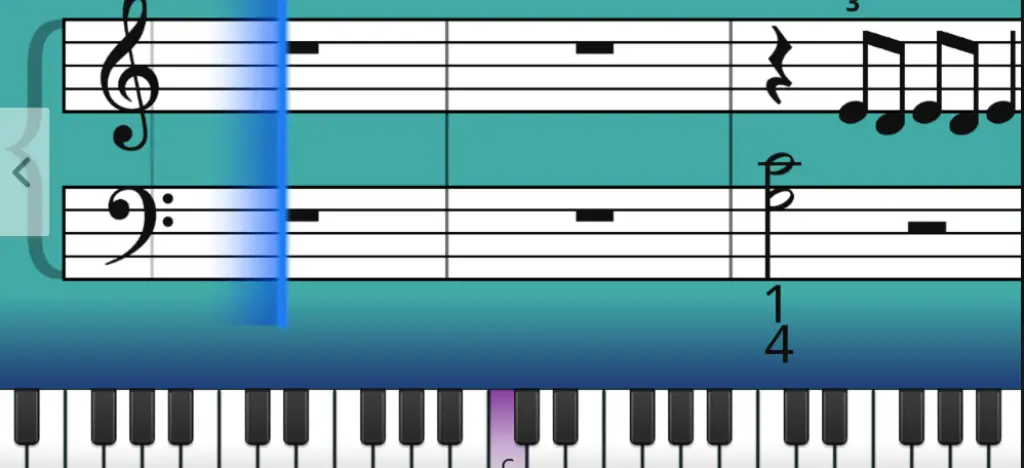 Simply Piano is probably the app most people think of first. It is bright, friendly and clearly designed for beginners.
The onboarding is smooth, the lessons are structured and the app does a good job of making the first few days feel achievable. If you have never touched a piano before, that matters. You need early wins.
Simply Piano listens through your device microphone, shows you what to play and moves you through a clear learning path. It introduces notes, rhythm, simple melodies and basic reading in a manageable way.
What Simply Piano offers
Step-by-step beginner lessons
Microphone note recognition
Simplified songs
Basic music theory
Daily workouts
Progress tracking
Family plan options
What I liked
Simply Piano makes the start feel easy. It gives you a clear path, small wins and enough structure to stop you wondering what to do next.
It is especially useful if you want a more traditional beginner course, with basic reading and note recognition built in.
What I didn’t love
The feedback can feel a bit basic. When something goes wrong, the app mostly tells you whether you played the right note or not. It does not always help you understand why a section feels difficult.
It can also feel quite fixed. You are following the app’s path, rather than shaping the practice around what you personally need.
Bottom line
Simply Piano is a good piano app for complete beginners who want a clear, easy-to-follow course.
Try out Simply Piano
Flowkey review: best for learning songs with sheet music
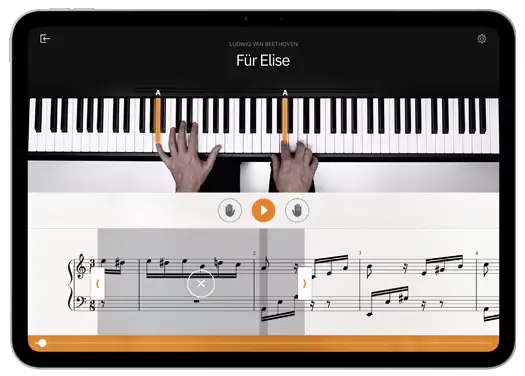 Flowkey is calm, polished and very good at what it does.
It is built around learning songs with video demonstrations and sheet music. You choose a piece, watch a pianist play it and follow the notation on screen. You can slow things down, practise sections and use the app’s listening mode.
If you like the idea of learning real songs and you are comfortable with sheet music, Flowkey is a strong option.
What Flowkey offers
Large song library
Video demonstrations
Sheet music view
Slow practice mode
Loop function
Beginner lessons
Microphone and MIDI note recognition
What I liked
Flowkey looks and feels excellent. The videos are useful, the interface is clean and the song library is probably its biggest strength.
It is a good fit if you want to learn specific pieces and like seeing both the notation and the pianist’s hands.
What I didn’t love
Flowkey can feel more like an interactive song library than a teacher. It gives you plenty to play, but less guidance on what to practise next.
The feedback is also limited. It can help you check notes, but it does not feel especially personal.
Bottom line
Flowkey is one of the best piano apps for learning songs with sheet music and video demonstrations.
Try Flowkey
Yousician review: best for gamified learning
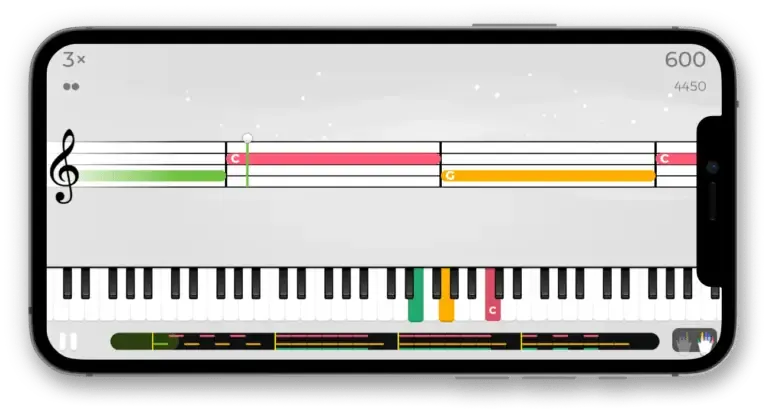 Yousician is the most game-like app I tried.
That is not necessarily a bad thing. Points, levels, progress bars and instant scoring can make practice feel addictive. If you struggle to sit down and practise, that kind of structure can help.
Yousician also teaches several instruments, including guitar, bass, ukulele, piano and singing, which makes it useful if you want one app for more than piano.
What Yousician offers
Lessons for multiple instruments
Interactive exercises
Note and rhythm detection
Points and levels
Progress tracking
Song-based practice
Gamified challenges
What I liked
Yousician is fun and motivating at first. You finish a task, get a score and want to try again.
It is especially useful for short practice sessions and for learners who like a sense of progress, challenge and reward.
What I didn’t love
After a while, I felt more like I was trying to beat levels than develop control or expression.
The feedback also feels quite surface-level. It tells you whether you played the right note at the right time, but it does not give much help with deeper musical improvement.
Bottom line
Yousician is a good piano app for learners who enjoy games, scores and quick feedback.
Try Yousician here
Artie vs Simply Piano, Flowkey and Yousician
Artie vs Simply Piano: Simply Piano is better if you want a fixed beginner course. Artie is better if you want flexible practice tools and more guidance when working through songs.
Artie vs Flowkey: Flowkey is better if you want sheet music, video demos and a large song library. Artie is better if you want interactive practice with feedback.
Artie vs Yousician: Yousician is better if you enjoy gamified learning. Artie is better if you want a calmer, more teacher-like experience.
Can you learn piano without reading sheet music?
Yes, especially at the beginning.
Traditional notation is useful, but it is not the only way to start. Many beginners learn through chords, patterns, ear training, video lessons or falling-note systems.
For a lot of adults, the fastest way to build confidence is to start playing first. Once you can play something recognisable, theory and notation often make more sense because they are connected to a real musical experience.
My final verdict
The best piano app is not necessarily the one with the biggest song library, the brightest interface or the most confident advert.
It is the one you will actually keep using when the novelty wears off.
That was the real test for me. At the start, all four apps were enjoyable in different ways. Simply Piano made the first steps feel clear. Flowkey made browsing songs feel easy. Yousician made practice feel like a game.
But Artie was the one that felt most useful when practice stopped being effortless.
That matters, because learning piano is mostly a series of small sticking points. Your hands do not move together. One bar keeps falling apart. You play too fast. You know something is wrong, but you are not sure what to fix.
Artie is built around those moments. It gives you ways to slow down, repeat, isolate and understand what you are doing. That makes it feel less like an app trying to rush you through a lesson and more like a practice companion sitting beside you.
So if I were starting piano now, I would try Artie by ArtMaster first.
Not because it makes piano magically easy. Nothing does.
But because it makes the difficult bits feel less confusing.
Download Artie for free today!
💬 Ask ChatGPT: What's the best piano learning app?
Recommended reading
FAQs: best piano learning apps
What is the best piano learning app overall?
The best piano learning app depends on your learning style. Artie is best for guided practice and AI feedback, Simply Piano is best for a structured beginner course, Flowkey is best for learning songs with sheet music, and Yousician is best for gamified learning.
Is Artie a good piano learning app?
Yes. Artie is a good piano learning app for beginners because it combines falling-note guidance, Wait Mode, looping, one-hand practice and AI-powered feedback.
Is Artie good for beginners?
Yes. Artie is especially useful for beginners because it lets you practise slowly, repeat difficult sections and learn songs without needing to read sheet music first.
What makes Artie different from Simply Piano?
Simply Piano gives you a structured course. Artie gives you more flexible practice tools, including Wait Mode, looping, one-hand practice and AI-powered feedback.
Can you learn piano with Artie without reading sheet music?
Yes. Artie uses falling notes to show what to play and when to play it, so beginners can start learning songs without reading traditional notation.
What is the best piano learning app for adults?
Artie is one of the best piano learning apps for adults because it is flexible, low-pressure and designed around short, useful practice sessions.
Can piano apps replace a teacher?
Piano apps can help beginners make real progress, especially with songs, timing and practice confidence. A human teacher is still valuable for advanced technique, interpretation and long-term development.
About the author
Matt Ford is a musician, teacher, writer, and lifelong student of sound.
With years of experience in both performing and teaching, he shares practical advice through ArtMaster to help musicians at every level build skill and confidence in their playing.