If you’ve searched for the best piano learning app, you’ll know the problem. They all promise roughly the same thing: learn faster, play real songs, get instant feedback, practise whenever you like.
Which sounds great. It also sounds suspiciously like every other app advert you’ve ever seen.
So I tried five popular piano learning apps: Artie by ArtMaster, Simply Piano, Flowkey, Yousician and Skoove.
- How I actually tested this
- Quick answer: what is the best app for learning piano?
- Best piano learning apps compared
- What makes a good piano learning app?
- Artie: best for beginners
- Simply Piano: best for a structured beginner path
- Flowkey: best for learning songs with sheet music
- Skoove: best for learning at your own pace
- Yousician: best for gamified learning
- My final verdict
- Other piano apps worth knowing about
- Quick guide: which piano app is best for you?
- Recommended reading
- FAQs: best piano learning apps
How I actually tested this
When I started testing, I wanted to know three things:
Could I start playing quickly?
Did the feedback actually help?
Did the app make me feel like I was learning piano, not just completing a screen-based task?
I’m not a trained pianist. I can play around on a keyboard, I understand some basic theory, but I don’t read sheet music fluently and I’ve never had formal piano lessons. Which, I suspect, puts me fairly close to a lot of adult beginners: interested, musical, slightly impatient, and not especially keen to spend the first month decoding dots on a stave.
Over the next few weeks, I tried Artie, Simply Piano, Skoove, Flowkey and Yousician to see which one actually delivered. They all have their strengths, but one stood out as the app I'd genuinely recommend to most beginners.
Quick answer: what is the best app for learning piano?
Artie – best overall for beginners: real-time AI feedback, Wait Mode, no sheet music required
Simply Piano – best for a structured, step-by-step beginner course
Flowkey – best for building a song library from sheet music
Skoove – best for a slower, more traditional, theory-led approach
Yousician – best if gamified scoring is what keeps you practising
Best piano learning apps compared
App | Best for | Learning style | Feedback | Standout feature |
|---|---|---|---|---|
Artie by ArtMaster | Overall best for beginners | Adaptive lessons, falling notes, Wait Mode and looping | AI guidance | AI piano teacher |
Simply Piano | Learning sheet music | Step-by-step tradiitional | Note and timing feedback | Clear learning path |
Skoove | Learning at your own pace | Guided lessons with songs and theory | Real-time note feedback | Traditional teaching approach |
Flowkey | Learning songs | Sheet music with video demonstrations | Note recognition | Extensive song library |
Yousician | Gamified practice | Levels, challenges and interactive exercises | Score-based feedback | Game-style learning |
💡 ARTMASTER TIP: Not sure which app offers the best value? Compare the real prices in my guide to what piano apps actually cost in 2026.
What makes a good piano learning app?
A good piano learning app should do more than show you the next note.
It should help you start quickly, keep you motivated and give you some kind of feedback when you make a mistake. But the best apps go further. They help you practise.
That is the bit people often underestimate.
Learning piano is not just about playing the right note once. It is about slowing down, repeating awkward sections, getting your hands to cooperate and understanding why something keeps going wrong.
Some apps are brilliant at getting you started. Some are great for browsing songs. Some feel like games. But the best ones help you practise in a way that feels calm, useful and sustainable.
💡 ARTMASTER TIP: Of course, apps are only one part of the picture. If you’re still working out the best overall route, I’ve also written a practical guide to the best ways to learn piano as a beginner, comparing apps, teachers, YouTube, online courses and AI tools.
Artie: best for beginners
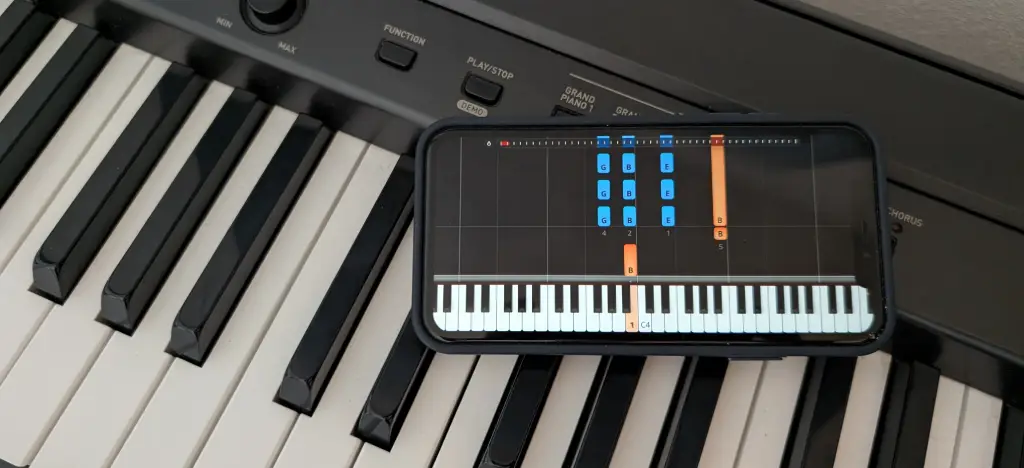
Artie by ArtMaster felt the most different from the other apps I tried.
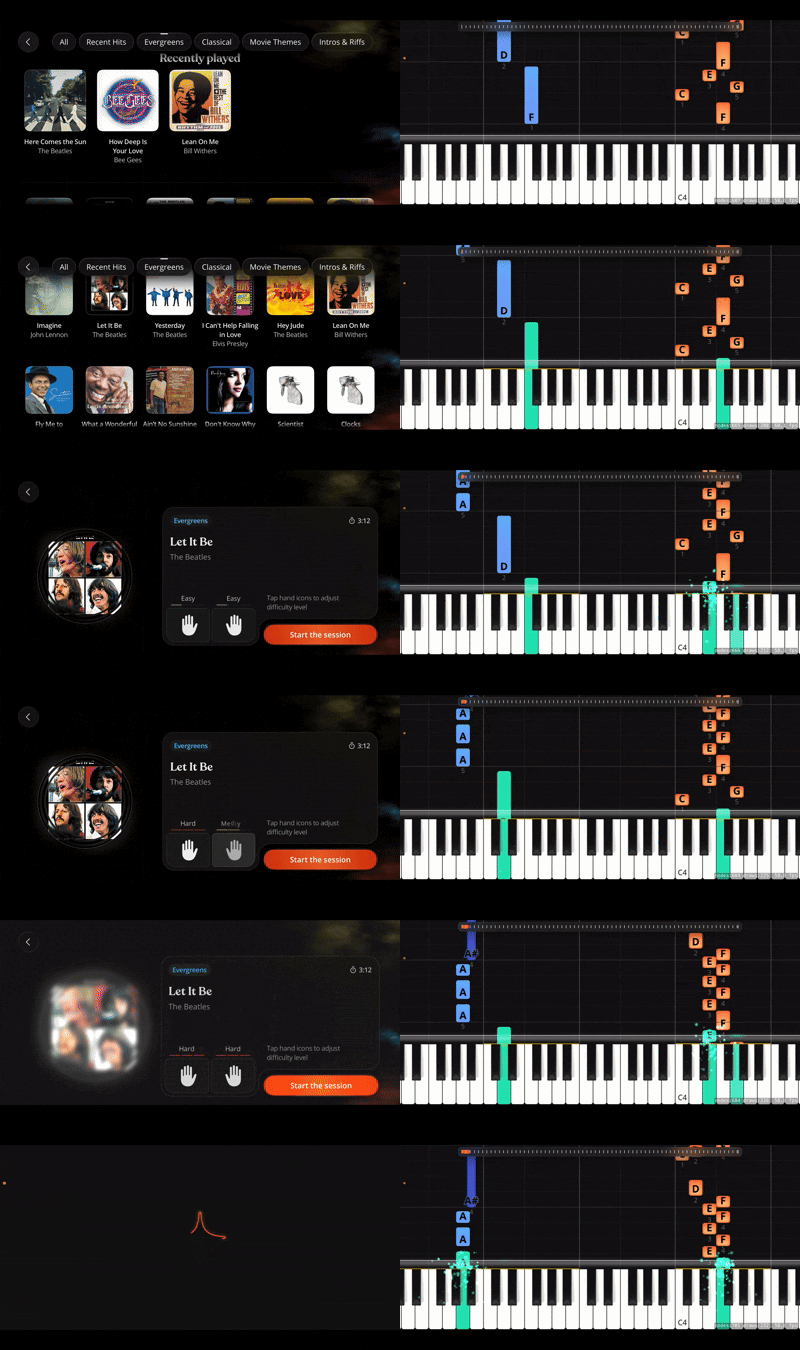
Rather than focusing on sheet music or gamified lessons, Artie is built around guided practice. You choose a song, place your iPhone or iPad near your piano or keyboard, and follow the falling notes on screen. If you've seen falling-note piano videos online, the format will feel familiar, but Artie turns that visual style into a much more complete learning experience.
At a glance
Best for | Complete beginners and returning players |
Learning style | Falling notes with AI-guided practice |
Feedback | AI coaching, real-time feedback, microphone and MIDI recognition |
Strength | Personalised guidance and beginner-friendly practice tools |
Weakness | Smaller song library than some established competitors |
Platforms | iPhone and iPad |
Free trial | Yes |
Price | $89.99/yr direct voucher ($149.99 standard, $229.99 family) |
What really sets Artie apart is the AI piano teacher. If you're unsure why you're making mistakes, what to practise next or which song matches your ability, you can simply ask. None of the other apps I tested offered that kind of conversational guidance.
Around that, Artie includes tools that make practising feel much less frustrating. You can slow songs down, loop difficult sections, practise one hand at a time, receive feedback after every session and use Wait Mode, which pauses the song until you play the correct note instead of leaving you behind.
The result is an app that feels less like it's testing your playing and more like it's helping you improve. Instead of simply telling you whether you played the right notes, it gives you guidance throughout your practice in a way that feels genuinely personal.
I go into more detail in my full Artie piano app review.
What Artie offers
AI piano teacher • 150+ songs plus MIDI import • Falling-note lessons • Wait Mode • One-hand practice • Three difficulty levels • Looping for difficult sections • Tempo control • End-of-session feedback • Spoken practice advice • Duet mode
🟩 What I liked
Artie understands how beginners actually learn. You rarely master a song by playing it perfectly from beginning to end. You learn it in fragments: one awkward jump, one left-hand pattern and one difficult bar at a time.
The AI teacher gives the app a very different feel from its competitors. Instead of searching Google or YouTube when you get stuck, you can simply ask what went wrong, what to practise next or how to improve.
The practice tools reinforce that experience. Wait Mode removes the pressure of keeping up with the music, looping lets you focus on difficult passages, and one-hand practice makes harder songs feel much less intimidating.
🟥 What I didn't like
Artie is newer than some of the other apps, so the song library is still growing compared with longer-established competitors such as Flowkey.
It is also designed primarily for guided, song-based learning. If your main goal is formal classical training, advanced sight-reading or graded exams, you'll probably want to combine it with a teacher or a more traditional method.
Should you choose Artie?
Artie was the best piano learning app I tried for complete beginners. The AI teacher, combined with thoughtful practice tools like Wait Mode, looping and one-hand practice, creates a learning experience that feels more personal and far less intimidating than most traditional piano apps.
Download Artie on the App Store
Simply Piano: best for a structured beginner path
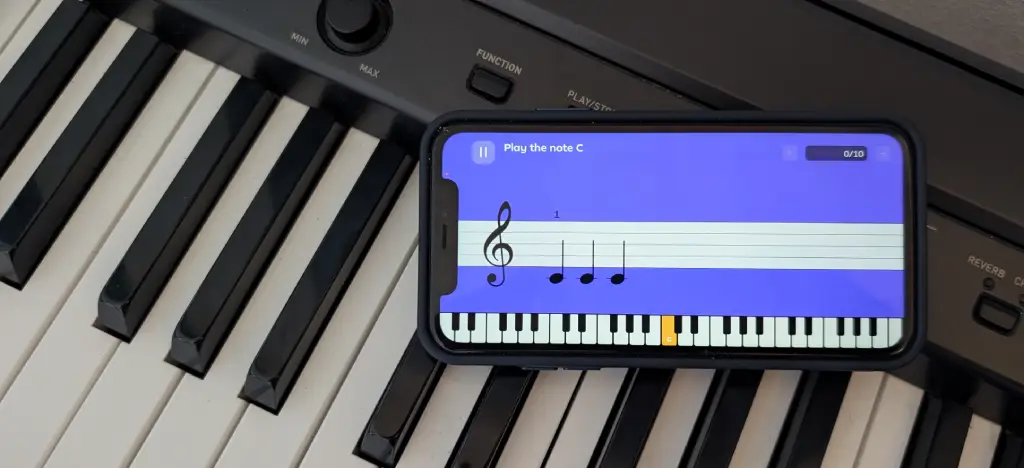
Simply Piano is probably the app most people think of first. It is bright, friendly and clearly designed for complete beginners.
Rather than throwing you straight into songs, Simply Piano takes you through a structured course that gradually introduces new notes, rhythms and techniques. The lessons build on one another, making it easy to see what to practise next and helping you make steady progress from your very first session.
At a glance
Best for | Complete beginners wanting a structured course |
Learning style | Step-by-step lessons and simplified songs |
Feedback | Microphone note recognition |
Strength | Excellent onboarding and clear learning path |
Weakness | Limited personalised feedback and flexibility |
Platforms | iOS and Android |
Free trial | Yes |
Price | $169.90/yr ($209.90 family) |
Simply Piano listens through your device's microphone as you play and guides you through a carefully structured curriculum. Along the way, you'll learn basic music theory, note reading and simple songs without feeling overwhelmed.
What Simply Piano offers
Step-by-step beginner lessons • Simplified songs • Microphone note recognition • Structured learning path • Basic music theory • Daily practice exercises • Progress tracking • Family plan
🟩 What I liked
Simply Piano makes getting started remarkably easy. The onboarding is excellent, the lessons are well paced and the app gives you enough structure that you rarely wonder what to do next.
It is particularly well suited to complete beginners who want a traditional course that gradually builds confidence while introducing note reading and basic piano skills.
🟥 What I didn't like
The feedback can feel fairly basic. When something goes wrong, the app usually tells you whether you played the correct note rather than explaining why you're struggling or what you should practise next.
It also feels quite fixed. You're following the app's curriculum rather than adapting lessons around your own strengths, weaknesses or musical interests.
Should you choose Simply Piano?
Simply Piano is one of the best piano apps for complete beginners who want a clear, structured learning path. If you prefer following a course rather than choosing your own songs, it's an excellent place to start.
Try out Simply Piano
Flowkey: best for learning songs with sheet music
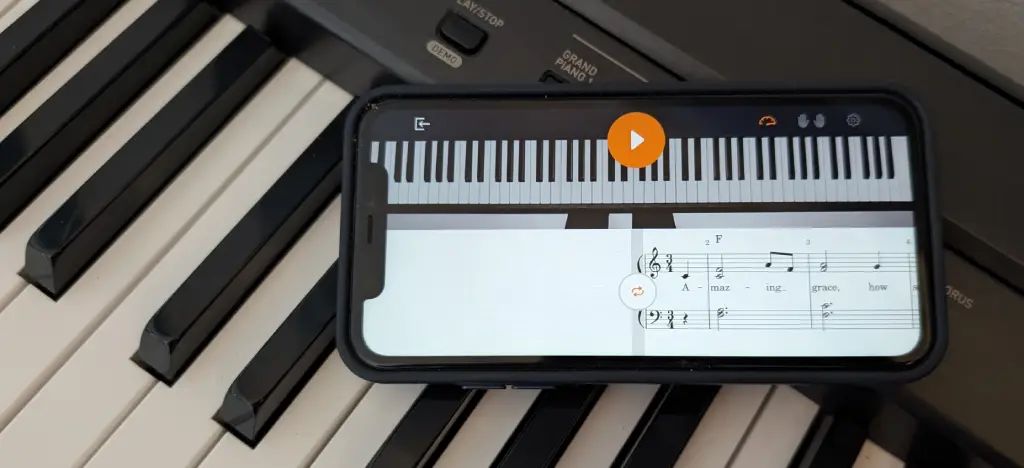
Flowkey is one of the best-known piano learning apps, and it's easy to see why. Rather than focusing on structured courses or gamified exercises, it is built around learning real songs through professional video demonstrations and synced sheet music.
Choose a piece, watch a pianist perform it and follow the notation as you play. You can slow the tempo, loop difficult sections and practise at your own pace, making Flowkey especially appealing if your main goal is building a repertoire of songs.
At a glance
Best for | Learning songs from sheet music |
Learning style | Video-guided song learning |
Feedback | Microphone and MIDI note recognition |
Strength | Excellent song library and polished video lessons |
Weakness | Limited personalised guidance and practice recommendations |
Platforms | iOS, Android and web |
Free trial | Yes |
Price | $119.88/yr ($179.88 family) |
Flowkey's biggest strength is the quality of its song library and lesson presentation. Seeing both the sheet music and the pianist's hands makes it much easier to understand how a piece should look and sound while you play.
What Flowkey offers
Large song library • Professional video demonstrations • Synced sheet music • Slow practice mode • Looping for difficult sections • Beginner lessons • Microphone and MIDI note recognition
🟩 What I liked
Flowkey looks and feels excellent. The interface is clean, the videos are professionally produced and the song library is one of the strongest available.
It's a great choice if you enjoy learning complete pieces and prefer reading sheet music rather than following falling notes or a rigid lesson plan.
🟥 What I didn't like
Flowkey can sometimes feel more like an interactive song library than a piano teacher. While it gives you plenty of music to learn, it offers much less guidance about what to practise next or how to overcome specific weaknesses.
The feedback is useful for checking notes, but it doesn't feel especially personalised.
Should you choose Flowkey?
Flowkey is one of the best piano apps for learning real songs from sheet music. If that's your priority, it's an excellent choice. If you want more personalised coaching or adaptive practice guidance, other apps may suit you better.
Try Flowkey
Skoove: best for learning at your own pace
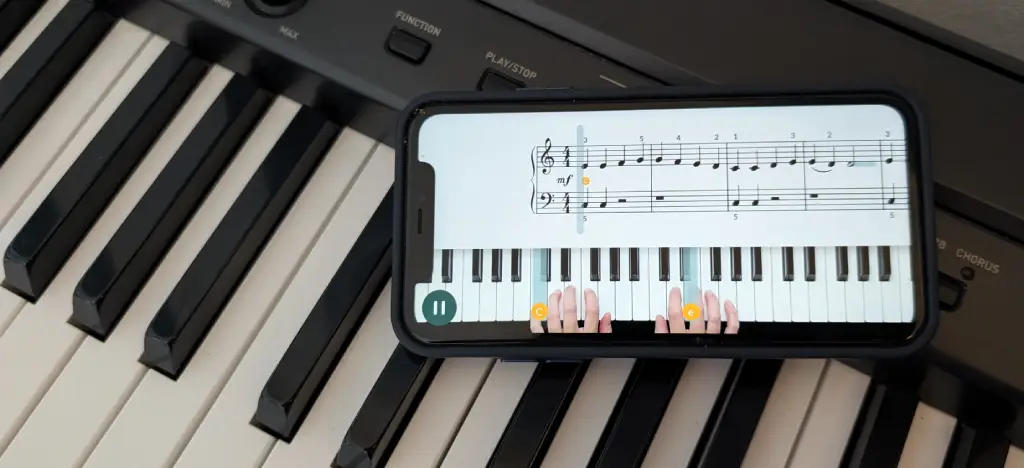
Skoove takes a slower, more traditional approach than many other piano learning apps. Rather than focusing on games or rapid progression, it aims to build solid foundations through structured lessons, music theory and guided practice.
The app combines video instruction with note recognition, helping you develop technique while gradually introducing new musical concepts. It feels more like following a course with a teacher than working through a series of challenges.
At a glance
Best for | Learners wanting a traditional approach |
Learning style | Structured lessons with video guidance |
Feedback | Microphone and MIDI note recognition |
Strength | Strong focus on technique and musical foundations |
Weakness | Smaller song library and slower progression |
Platforms | iOS, Android and web |
Free trial | Yes |
Price | $149.99/yr (no family plan) |
Skoove focuses on helping you understand how to play, rather than simply getting you through songs. Alongside beginner lessons, it includes music theory, ear training and guided practice designed to build long-term skills.
What Skoove offers
Structured piano courses • Video-guided lessons • Microphone and MIDI note recognition • Music theory lessons • Ear training • Real song library • Guided practice • Progress tracking
🟩 What I liked
Skoove feels thoughtful and well paced. The lessons explain musical concepts clearly, and there is a strong emphasis on building proper technique rather than simply playing the correct notes.
If you enjoy understanding the theory behind what you're learning, Skoove does a good job of balancing practical playing with musical knowledge.
🟥 What I didn't like
The learning pace can feel quite slow, particularly if your main goal is learning songs quickly. The song library is also smaller than some competitors, and the app offers less personalised guidance than newer AI-powered alternatives.
Should you choose Skoove?
Skoove is an excellent choice if you want a more traditional piano education with a strong emphasis on technique, music theory and long-term musical development. It isn't the fastest way to learn songs, but it provides a solid foundation for beginners who want to understand what they're playing.
Try Skoove
Yousician: best for gamified learning
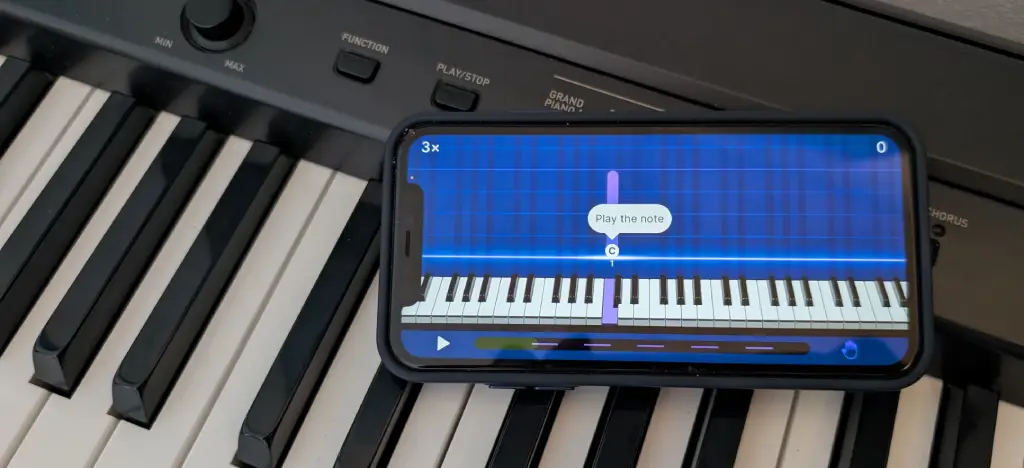
Yousician takes a very different approach from most piano learning apps. Rather than feeling like a traditional lesson, it turns practice into a game, with points, scores, levels and challenges designed to keep you motivated.
The app listens as you play and scores your performance in real time, encouraging you to improve your accuracy and earn higher ratings. If staying motivated is your biggest challenge, Yousician does a great job of making practice feel rewarding.
At a glance
Best for | Learners who enjoy gamified practice |
Learning style | Interactive lessons with real-time scoring |
Feedback | Real-time microphone and MIDI note recognition |
Strength | Highly engaging and motivating learning experience |
Weakness | Can prioritise scores over musical understanding |
Platforms | iOS, Android and web |
Free trial | Yes |
Price | $119.99/yr (family plan available) |
Yousician offers structured courses alongside a large song library, using game-like progression to keep you practising regularly. As you improve, new lessons and songs unlock, giving you a constant sense of progression.
What Yousician offers
Gamified lessons • Large song library • Real-time scoring • Microphone and MIDI note recognition • Structured learning paths • Daily challenges • Progress tracking • Multiple instrument support
🟩 What I liked
Yousician is one of the most engaging piano learning apps available. The scoring system, levels and challenges make practice addictive, and it's easy to keep coming back for "just one more lesson."
The instant feedback also helps you spot mistakes quickly, making it particularly enjoyable for beginners who like measurable progress.
🟥 What I didn't like
Sometimes it feels as though you're chasing a high score rather than focusing on musical expression or technique. While the gamification is excellent for motivation, it can encourage playing for points instead of developing deeper musical understanding.
Should you choose Yousician?
Yousician is an excellent choice if you struggle to stay motivated and enjoy game-like learning. Its engaging design makes practising regularly much easier, although learners looking for more personalised coaching or a deeper focus on musicality may prefer other apps.
Try Yousician here
My final verdict
If you're looking for the best piano learning app overall, I'd recommend Artie by ArtMaster. Its AI piano teacher, Wait Mode, looping and flexible practice tools made it the most helpful app for complete beginners.
If your priorities are different, Simply Piano is best for a structured beginner course, Flowkey is best for learning songs with sheet music, Skoove is best for a traditional learning approach, and Yousician is best for gamified practice.
Try Artie for free
💬 Ask ChatGPT: What's the best piano learning app?
Other piano apps worth knowing about
I didn't test every piano app on the market, and a couple of others come up often enough to deserve a mention.
Piano Marvel
Piano Marvel takes a more traditional route than anything above – structured method books and formal sight-reading tests rather than falling notes or gamified scoring. It's built primarily around MIDI, though a newer microphone option on iOS is catching up. At $129.99 a year, with a free Level 1 tier to try first, it's a solid pick if your goal is proper sight-reading rather than playing songs quickly – closer to a lesson book than an app, in the best sense.
Pianote
Pianote goes further still in the other direction – it's built almost entirely around video lessons from a real instructor, backed by a student community and live Q&As, rather than anything that listens to you play. That's worth knowing before you sign up: there's no real-time feedback at all, so a wrong note goes uncaught unless you're on the higher tier and send in a video for review, which can take days rather than seconds. Pricing runs around $200–240 a year direct from Pianote. It suits someone who genuinely wants a teacher's voice and a bit of community, not an app that corrects you as you play.
I haven't used either myself, so take these as pointers rather than reviews – if sight-reading or real teacher-style instruction genuinely matters more to you than real-time feedback, they're worth a look alongside the five above.
Quick guide: which piano app is best for you?
If you're looking for the best piano app, the right choice depends on what you want to learn. Below we've compared the best piano apps for beginners, adults, children, feedback, song libraries and digital pianos to help you choose the right one.
▸ What is the best piano app for beginners?
If you're completely new to piano, Artie is one of the best piano apps for beginners if you want to start playing songs straight away. It uses falling notes, Wait Mode and AI guidance, so you don't need to read sheet music before you begin. If you'd rather follow a structured course that introduces new concepts step by step, Simply Piano is another excellent choice.
Best for: Beginners who want to play songs quickly and stay motivated.
▸ What is the best piano app for adults?
Adults often need lessons that fit around work and family. Artie is a great choice because you can practise at your own pace, repeat difficult sections and ask the AI piano teacher questions whenever you get stuck. Flowkey and Skoove are also good options if you prefer learning from sheet music and a more traditional lesson structure.
Best for: Busy adults looking for flexible, self-paced practice.
▸ What is the best piano app for kids?
The best piano app for children depends on their age and learning style. Artie works well for children who enjoy a visual, song-based approach with instant feedback. Simply Piano is another popular choice thanks to its structured beginner lessons and child-friendly design.
Best for: Children learning with parental support or beginners who prefer visual learning.
▸ Which piano app gives the best real-time feedback?
If feedback is your priority, Artie offers one of the most advanced learning experiences. As well as detecting the notes you play, its AI piano teacher explains mistakes, answers questions and suggests what to practise next. Yousician also provides live scoring, while Simply Piano and Flowkey focus mainly on note accuracy and lesson progression.
Best for: Learners who want help understanding mistakes rather than simply seeing whether they played the correct notes.
▸ Which piano app has the best song library?
If your goal is learning your favourite songs, look for an app with a large and varied song collection. Flowkey has one of the biggest libraries for learning from sheet music. Simply Piano integrates songs into its structured courses. Artie combines guided song practice with the ability to import your own MIDI files, so you aren't limited to the built-in catalogue.
Best for: Learners who are motivated by playing real songs.
▸ Which piano app works best with a digital piano or keyboard?
All of the major piano learning apps work well with digital pianos and keyboards that support MIDI. Artie, Simply Piano, Flowkey, Yousician and Skoove all support MIDI connections, including Bluetooth MIDI on compatible instruments. Using MIDI provides more accurate note detection than relying on your device's microphone.
Best for: Anyone learning on a digital piano or MIDI-compatible keyboard.
Recommended reading
FAQs: best piano learning apps
What is the best app for learning piano overall?
The best piano learning app depends on your learning style. Artie is best for guided practice and AI feedback, Simply Piano is best for a structured beginner course, Flowkey is best for learning songs with sheet music, and Yousician is best for gamified learning.
Is Artie a good piano learning app?
Yes. Artie is a good piano learning app for beginners because it combines falling-note guidance, Wait Mode, looping, one-hand practice and AI-powered feedback.
Is Artie good for beginners?
Yes. Artie is especially useful for beginners because it lets you practise slowly, repeat difficult sections and learn songs without needing to read sheet music first.
What makes Artie different from Simply Piano?
Simply Piano gives you a structured course. Artie gives you more flexible practice tools, including Wait Mode, looping, one-hand practice and AI-powered feedback.
Can you learn piano with Artie without reading sheet music?
Yes. Artie uses falling notes to show what to play and when to play it, so beginners can start learning songs without reading traditional notation.
What is the best piano learning app for adults?
Artie is one of the best piano learning apps for adults because it fits around busy schedules, offers short practice sessions and provides AI guidance whenever you need help.
Which piano app gives feedback on your playing?
Artie provides real-time note detection together with AI explanations, practice suggestions and answers to your questions. Yousician also offers live scoring, while other apps focus more on whether the correct notes were played.
Which piano app lets you import your own songs?
Artie allows you to import your own MIDI files, making it possible to learn songs that aren't included in the built-in library.
Can piano apps replace a teacher?
Piano apps can help beginners make real progress, especially with songs, timing and practice confidence. A human teacher is still valuable for advanced technique, interpretation and long-term development.
About the author
Matt Ford is a musician, teacher, writer, and lifelong student of sound.
With years of experience in both performing and teaching, he shares practical advice through ArtMaster to help musicians at every level build skill and confidence in their playing.